
Retro Emulator Co-Op: A Comprehensive Review and Download Guide
Screenshots


Introduction
Retro Emulator Co-Op, developed by MoonCycle, is a powerful all-in-one retro game emulator that brings the nostalgia of classic gaming into the modern era. With its recent version 1.0.9, this app enhances your gaming experience by supporting smooth performance, online multiplayer capabilities, and the ability to relive your favorite retro moments with friends. The app is designed for both solo players and those looking to engage in real-time cooperative gameplay through advanced online co-op netplay support. The developers emphasize that Retro Emulator Co-Op does not include any games or copyrighted ROM files, meaning users must obtain their own legal game backups to utilize this platform.
Graphics & Gameplay
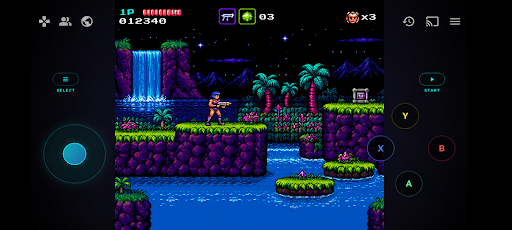
Upon launching Retro Emulator Co-Op, users are greeted with a visually appealing interface that combines nostalgic retro design elements with modern aesthetics. The app's graphics are vibrant and polished, ensuring an engaging experience whether you’re playing on a phone or tablet. The screenshots showcase a stylish retro-inspired layout with smooth animations that enhance the user experience. The virtual buttons are well designed, allowing for easy navigation and gameplay, which is important for those who prefer touch controls. Additionally, the app supports screen casting and TV mirroring, so you can enjoy your retro gaming sessions on larger displays, further enhancing the overall experience.
Key Features
- High Performance Emulation: Retro Emulator Co-Op ensures a smooth and optimized gaming experience with fast loading times and stable gameplay.
- Online Multiplayer & Co-Op Netplay: Play classic games with friends online through public and private multiplayer lobbies, complete with low latency peer-to-peer connections.
- Customizable Controls: Tailor your gaming experience by moving and resizing virtual buttons, choosing from multiple controller themes, and enjoying full Bluetooth and USB controller support.
- Save & Load System: Quickly save and load your game states, allowing you to continue your gaming journey at any time.
- Modern User Interface: The app features a customizable home theme with smooth animations and modern layouts, optimized for various devices.
- Game Library Features: Easily manage your ROMs with a recently played games list and a favorites system.
- Big Screen Support: Enjoy retro gaming on larger displays with screen casting and mirroring options.
- Advanced Features: Implement video filters, scaling options, and performance optimizations to tailor your gaming experience further.
Mod Features
For users seeking an enhanced experience, several plausible mod features could be imagined for Retro Emulator Co-Op, including:
- Premium Unlocked: Access to all features without any limitations, providing a more comprehensive gaming experience.
- No Ads: Enjoy uninterrupted gameplay without the distraction of advertisements.
- Unlimited Money: Gain access to infinite in-app currency for purchasing customizable themes or special features within the app.
- Enhanced Performance: Boost your emulator's speed and responsiveness beyond standard capabilities, ensuring an ultra-smooth gaming experience.
- Exclusive Game Packs: Unlock special game packs featuring additional retro titles to expand your gaming library.
How to Install APK on Android
Installing Retro Emulator Co-Op on your Android device is a straightforward process. Follow these steps for a smooth installation:
- Go to the settings on your Android device and enable "Install from Unknown Sources" to allow installations from sources other than the Google Play Store.
- Download the APK file from a trusted source. You can find the official APK link from the provided URL.
- Once the download is complete, open your device's file manager and navigate to the folder where the APK file is saved.
- Tap on the APK file to initiate the installation process. Follow the on-screen instructions to complete the installation.
- Once installed, you can open Retro Emulator Co-Op from your app drawer and start loading your favorite retro games.
Conclusion
Retro Emulator Co-Op is an excellent choice for those looking to experience the joy of classic gaming with friends in a modern setting. With its powerful emulation engine, customizable controls, and online multiplayer capabilities, it caters to both nostalgic gamers and newcomers alike. The app's sleek interface and advanced features make it a must-have for anyone interested in retro gaming. Don't miss out on this opportunity to relive your favorite classic moments!
Ready to download Retro Emulator Co-Op? Click the link below to get started!